Direct-sown crops need an outdoor sowing window. Transplanted crops need an indoor start, an acclimation period and an outdoor move. Keep those methods separate before comparing dates, or a mixed garden calendar can tell you to do the wrong action on the right day.
The same date can mean two different jobs
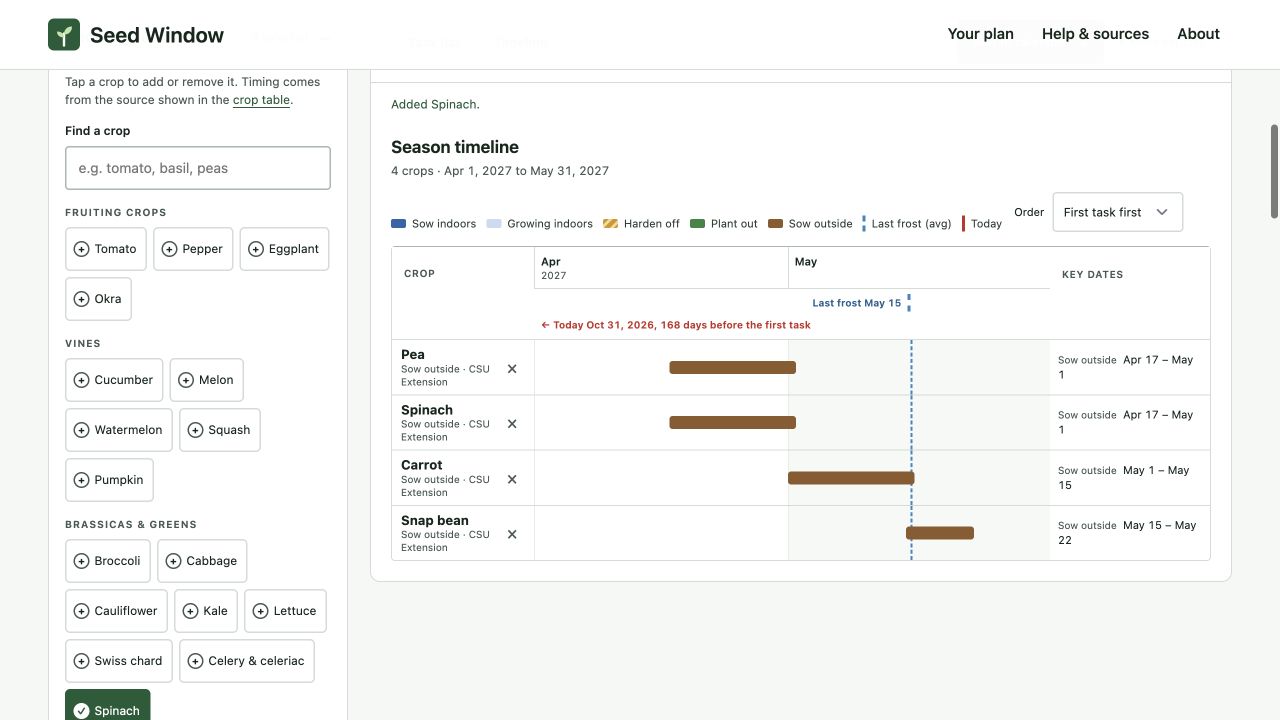
Consider May 1 in a plan based on a May 15, 2027 last spring frost. In Seed Window, May 1 can be the first direct-sowing date for Carrot and the earliest planting-out date for an already-grown Broccoli transplant. A list containing only crop names and dates cannot convey that difference.
The workspace distinguishes Sow outside, Sow indoors and Plant out. The source table also records the selected method. The distinction belongs in a printed schedule or calendar entry, not just in a legend color.
Four direct-sowing windows under one frost assumption
| Crop | Direct-sowing window | Offset used |
|---|---|---|
| Pea | April 17–May 1 | 28–14 days before |
| Spinach | April 17–May 1 | 28–14 days before |
| Carrot | May 1–15 | 14–0 days before |
| Snap bean | May 15–22 | 0–7 days after |
The cool-season groupings and relative dates come from Colorado State University Extension’s Vegetable Planting Guide, which also makes soil temperature and soil readiness part of the planting decision. These relative-date windows should not override those conditions.
The bean row deserves a particularly careful reading. The source says to sow around the frost date. Seed Window represents “around” as the frost date through seven days later. The seven-day bar is an explicit modelling choice, not a source-established last acceptable sowing day. Sweet corn uses the same convention. A warmer planting window may be appropriate locally.
The preset method is not a biological prohibition
There are 30 built-in rows: 23 use indoor starts and seven use direct sowing. The direct-sowing rows are Spinach, Carrot, Beet, Radish, Pea, Snap bean and Sweet corn. This is the tool’s coverage, not a claim that every other crop must be transplanted or that these seven can never be transplanted.
That limitation matters for a grower comparing techniques. A built-in row gives one supported route through the planner. It is not a menu of every possible propagation method for that species. If you intend to direct-sow a crop whose preset is an indoor start, use Add your own crop or variety and choose Sow straight outside. Supply an outdoor offset supported by the packet or your extension service.
A method-selection check before adding a row
- Identify what you have. A seed packet, a purchased transplant and an established plant need different schedules.
- Identify the instruction’s reference point. Is it weeks before frost, weeks before transplant, or a soil-temperature threshold?
- Choose the matching row type. A direct-sow custom row needs an outdoor window, not an indoor week count.
- Name the assumption. A variety-specific custom row should not look like a second generic crop with contradictory instructions.
- Check the task title. A direct-sow row should produce one sow-outside task, not an acclimation task for a seedling that does not yet exist.
Audit the output before taking it into the garden
Select Pea, Spinach, Carrot and Snap bean, then choose Timeline. You should see four brown outdoor windows and four tasks. Now add Tomato: it contributes three actions—sow indoors, begin hardening and plant out—bringing the total to seven. This small mixed-method example exposes errors more clearly than selecting all crops at once.
Use More exports → CSV to inspect the method and action-date columns; the 30-crop example CSV is available for comparison. CSV rows represent crops, while calendar events represent actions, so their row counts should differ. Read the count-back guide if you need to add a transplant alongside a direct-sown crop.
About this report
Written by the team that builds Seed Window. Numerical examples use the published planner rules and hypothetical inputs. Interface screenshots were captured on 31 October 2026 with synthetic plans; the later Saved plans and backup controls are not shown. These are calculation and workflow checks, not crop-growing or yield trials; no independent horticultural review is claimed. Source links beside the relevant claims let you inspect their scope.
Reproduce the examples and inspect the evidenceMake the dates your own
Look up your NOAA frost date by ZIP code, choose only the crops you grow, and check the resulting task windows.
Find your frost date and plan →