Choose the day you intend to transplant, then reserve roughly seven to ten days before it for gradual outdoor acclimation. Seed Window places a ten-day planning window before the earliest planting date; adjust the routine when weather or the actual planting day changes.
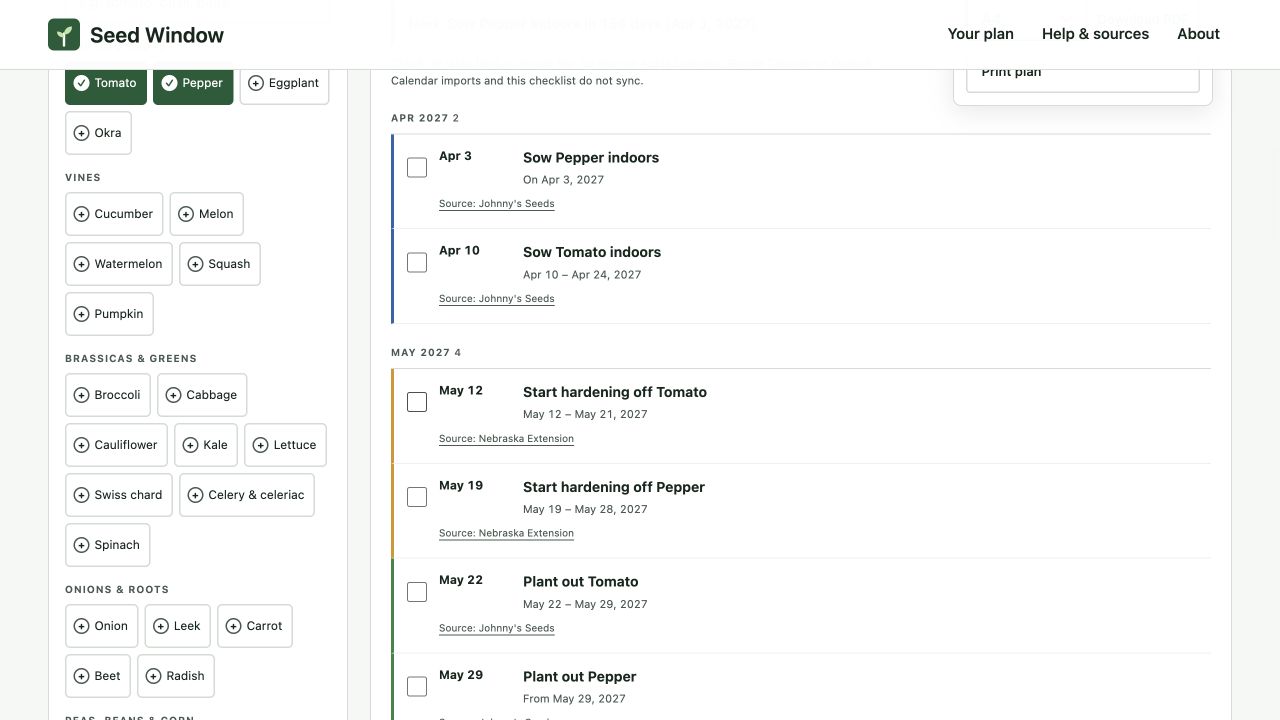
A period of exposure, not a cold-resistance switch
Nebraska Extension recommends a gradual seven-to-ten-day process: begin with a short, sheltered outdoor exposure and build time and sunlight rather than suddenly leaving indoor-grown plants out all day. Its guidance also warns that hardening does not make warm-season plants withstand freezing.
The article’s schedule below is a way to reserve attention for that process. It is not a rigid daily prescription, and it was not tested on a batch of living seedlings. Temperature, wind, sun, moisture and the condition of the plants still determine whether an exposure is suitable.
Worked example: tomatoes going out May 22
With a May 15, 2027 frost-date input, the built-in Tomato row begins planting out on May 22. The model subtracts ten calendar days for the hardening start and ends the hardening window the day before planting.
| Milestone | Ten-day plan | Seven-day alternative |
|---|---|---|
| First planned acclimation day | May 12 | May 15 |
| Last day before planting | May 21 | May 21 |
| Intended transplant | May 22 | May 22 |
The subtraction can look off by one until you list the days: May 12 through May 21 contains ten days, and May 22 is planting day. The planner’s ten-day choice is the longer end of the cited range. It is not a claim that ten days always suffices.

Use the task without losing the window
In Task list, find Start hardening off Tomato. The first date prompts you to begin; the smaller text shows the whole window. The separate Plant out Tomato task follows it. This is more useful than one vague “prepare seedlings” note because the two actions can be reviewed independently.
Use a simple observation log alongside the task: exposure location, duration, weather and plant response. “Sheltered spot, short first outing, no visible wilting” is a more useful record than “day one complete” alone. Increase exposure cautiously according to local advice and the plants’ response; do not force an outing merely to maintain an unbroken streak.
What if planting moves to May 29?
A ten-day countdown to May 29 begins May 19, ending May 28. But Seed Window’s generic Tomato row still anchors hardening to the earliest edge, May 22. Clicking a later point on the green bar does not change that anchor: the timeline does not offer point-by-point transplant selection.
For a specific May 29 target, add a custom tomato row whose planting offset is exactly two weeks after May 15. Keep both ends of that offset at two weeks, then check its new dates. Alternatively, record the actual target and adjust your routine manually. Do not restart a well-progressed plant’s acclimation from day one solely because the planner date changed.
Keep weather decisions separate from history
Use +1 wk to explore a later garden-wide frost assumption before sowing. After sowing, that button recomputes the plan, not the past: an actual April sowing remains an April sowing. If only tomatoes are delayed, a tomato-specific plan is clearer than moving every crop.
The task checkbox is stored on the current browser and a date-based task key. If a new frost input moves an action to a different date, the old check mark may no longer match the new task. That prevents assuming newly dated work is already done, but it also means the progress display is not a permanent cultivation log.
Take the start date with you
Add to calendar exports open tasks as all-day events. The hardening event is placed on the first day and its description carries the window; it does not automatically create ten daily visits or a notification alarm. Follow the calendar export guide to set a reminder in your calendar app. Before planting, revisit the frost-date and current-conditions checks rather than treating a completed acclimation task as clearance.
About this report
Written by the team that builds Seed Window. Numerical examples use the published planner rules and hypothetical inputs. Interface screenshots were captured on 31 October 2026 with synthetic plans; the later Saved plans and backup controls are not shown. These are calculation and workflow checks, not crop-growing or yield trials; no independent horticultural review is claimed. Source links beside the relevant claims let you inspect their scope.
Reproduce the examples and inspect the evidenceMake the dates your own
Look up your NOAA frost date by ZIP code, choose only the crops you grow, and check the resulting task windows.
Find your frost date and plan →